
Certificates lists the Apple certificates and tokens that Intune needs in order to manage iPhones, iPads and Macs, with the date each one expires. Each has to be renewed before that date. This page is there so that an expiry never comes as a surprise.
Everybody who can sign in to Eido can open it from the sidebar. You see the certificates of the Intune tenants and customers your role gives you access to.
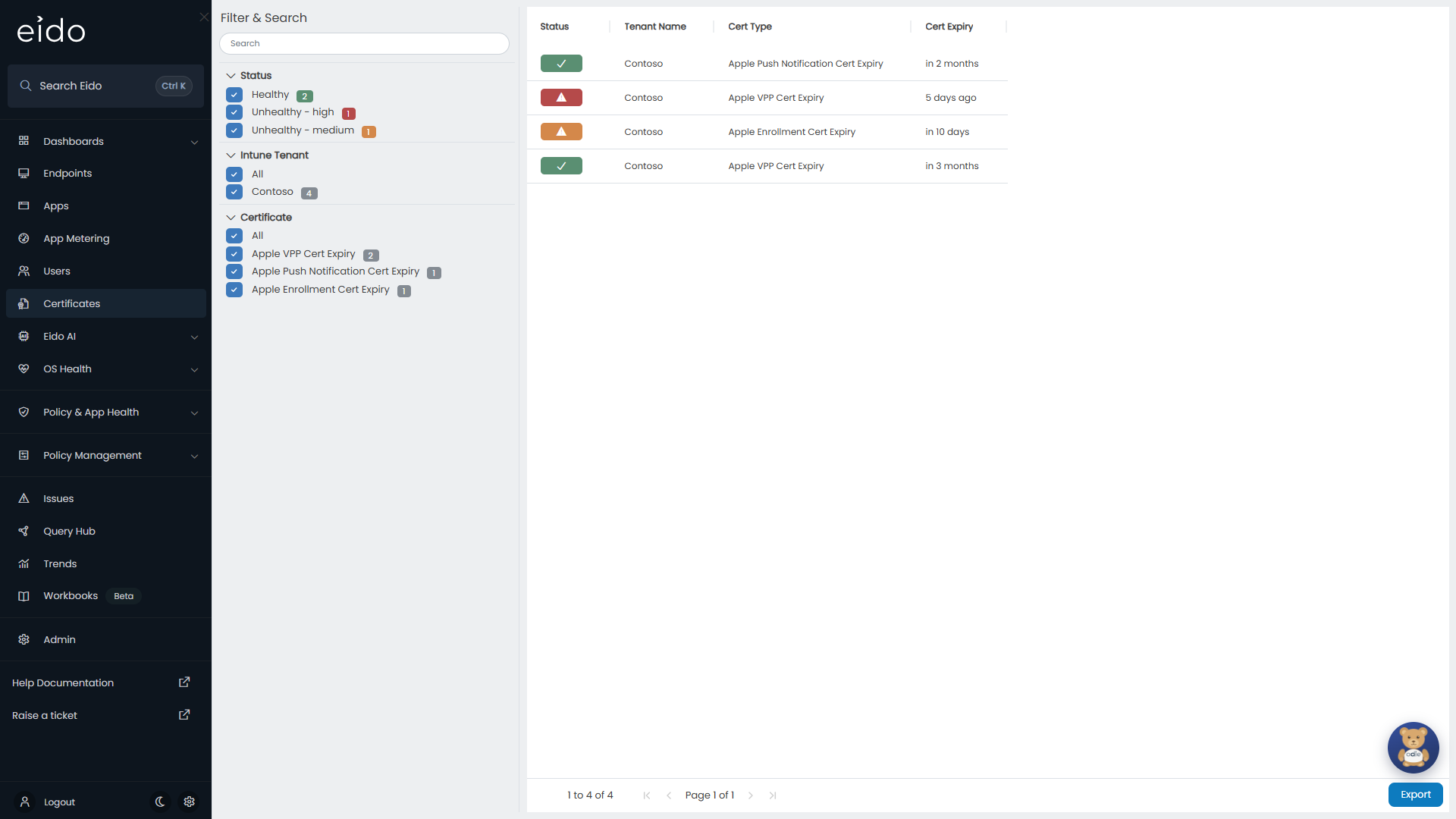
What is tracked#
Eido reads three kinds of certificate from each connected Intune tenant. The name in the Cert Type column tells you which.
| Cert Type | What it is | What Intune uses it for |
|---|---|---|
| Apple Push Notification Cert Expiry | The tenant’s Apple Push Notification certificate. | Communicating with enrolled Apple devices. |
| Apple VPP Cert Expiry | An Apple volume purchase token. A tenant can have several. | Assigning apps bought in volume from Apple. |
| Apple Enrollment Cert Expiry | An Apple device enrolment token. A tenant can have several. | Enrolling new Apple devices automatically. |
There is nothing to add by hand. Eido finds these in Intune at each sync. A tenant with no Apple management set up has no rows.
This page is about the certificates Intune itself depends on. Certificates installed on an individual device are in that device’s inventory, if it runs the Eido Client. See Device details.
The columns#
| Column | What it shows |
|---|---|
| Status | A badge for how close the certificate is to expiry. |
| Customer | The customer the tenant belongs to. Only shown when your organisation manages several customers and All Customers is selected. |
| Tenant Name | The Intune tenant the certificate belongs to. |
| Cert Type | Which of the three kinds it is. |
| Cert Expiry | How far away the expiry date is, for example “in 3 months”, or how long ago it passed. |
What the statuses mean#
A certificate’s status comes from the number of days left before it expires, compared with two thresholds set for its tenant.
| Badge | Status | When |
|---|---|---|
| Green tick | Healthy | More days are left than the medium threshold. |
| Amber warning triangle | Unhealthy - Medium | The days left have reached the medium threshold. Unless it has been changed, that is 14 days. |
| Red warning triangle | Unhealthy - High | The days left have reached the high threshold, or the certificate has already expired. Unless it has been changed, that is 7 days. |
| Grey question mark | Unknown | No thresholds are set for the tenant, so Eido cannot grade the certificate. |
An administrator sets the thresholds for each tenant under Certificate Expiry Thresholds, as Days until Medium and Days until High. A year long certificate that takes your organisation a few weeks to renew deserves a longer warning than the default. See Tenant settings.
Filter and search#
The Filter & Search panel on the left narrows the list.
- Search matches text anywhere in a row.
- Status shows how many certificates are at each status. Select the ones you want to see.
- Customer and Intune Tenant limit the list to the customers or tenants you select.
- Certificate limits it to one or more of the three kinds.
When a filter is hiding rows, a note at the top of the panel reads “Filtering 2 of 9” with your own numbers.
Export, at the bottom right, downloads the rows currently listed as a CSV file.
Look at one certificate#
Click a row to open Certificate. It shows the full record Intune holds for it, as a list of fields you can expand. Use it to check the detail you need before renewing, such as which token a row refers to when a tenant has several. Close returns you to the list.
When a certificate is close to expiry#
Renewal happens with Apple and in the Intune admin centre, not in Eido.
While a certificate is amber or red, Eido also keeps an issue open for it, so it shows on the Issues page and can trigger an alert. When you renew, the new expiry date arrives at the next sync, the status returns to Healthy and the issue closes by itself.
Common questions#
Why is the list empty?#
None of your connected tenants has Apple device management set up, or the first sync has not finished yet.
I renewed a certificate. Why is it still red?#
Eido picks up the new expiry date the next time it syncs the tenant. An administrator can start a sync straight away with Sync Now in Tenant settings.
Why does a certificate read Unknown?#
The tenant’s Days until Medium or Days until High is empty. Ask an administrator to set both.
A token was deleted in Intune. Why is it still listed?#
Eido removes a certificate once it has not seen it in Intune for 48 hours, and closes its issue at the same time.
Can I add a certificate of my own to track?#
No. The page lists what Eido finds in Intune.