
Query Hub is where you ask your own questions of the data Eido holds. Every list, chart and count elsewhere in Eido is built on the same engine, and Query Hub gives you that engine directly: pick a set of data, choose the columns, filter it, group it, chart it, then save the result as a report.
Query Hub is in the sidebar for everybody who can sign in. It opens on the report library, which holds three things: the reports Eido ships with, the reports your colleagues have shared, and your own.
What you see in any report is always limited to the devices, users and customers your role allows. Two people running the same report can get different rows.
Where Odie is switched on, a strip across the top of the report library says the same thing this page does: Ask Odie to do it. It is much easier. Ask Odie opens him, and the cross puts the strip away for good in that browser.
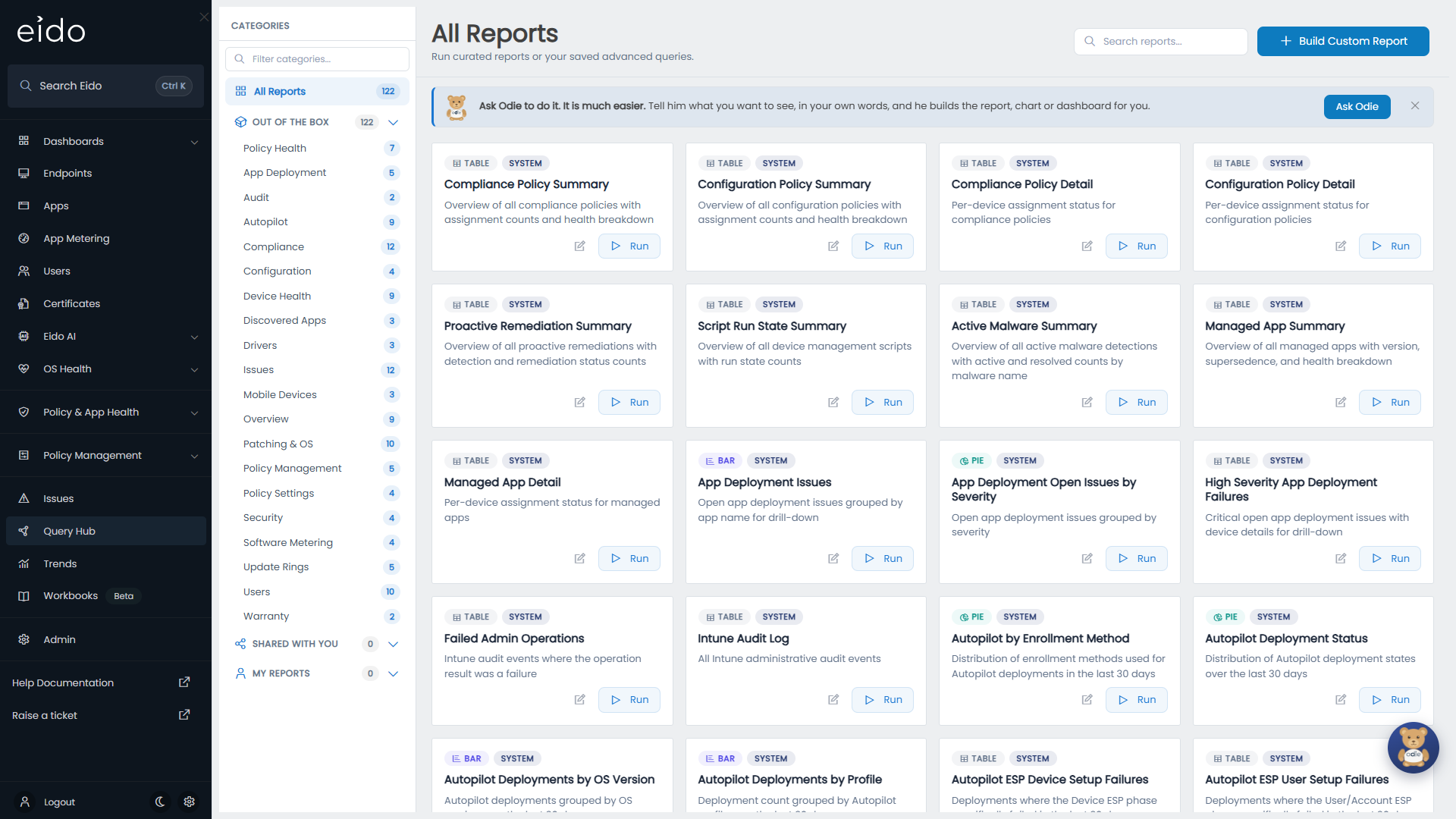
How the library is laid out#
The left-hand panel, Categories, has an All Reports entry and three sections. Each section lists the categories that have at least one report in it, with a count beside each.
| Section | What is in it |
|---|---|
| Out of the Box | The reports Eido ships with. Everybody sees these. They cannot be changed or deleted. |
| Shared With You | Reports other people have saved and switched Shared on for. |
| My Reports | Reports you saved yourself, shared or not. |
Press a section to see everything in it, or a category under it to narrow further. The arrow at the right of a section header folds it away. Filter categories… at the top narrows the list of categories, and Search reports… above the cards searches report names and descriptions within whatever you have selected.
Reading a report card#
| On the card | Meaning |
|---|---|
| Table, Bar, Pie or Tile | How the report presents its results. |
| System | One of the built-in reports. |
| Shared | Somebody saved this report and shared it. |
| Scheduled | The report is emailed on a schedule. Hover over the badge for how often. |
| The name and description | What the report is for. A report saved without a description shows “No description provided.” |
| A person’s name | Who owns the report. Built-in reports have no owner. |
| The pencil | Opens the report with the query builder showing, ready to change. |
| Run | Opens the report and shows the results. |
| The bin | Deletes the report. Only on reports you own. |
Run a report#
-
Find the report
Pick a category, or type part of its name into Search reports….
-
Press Run
The report opens in a panel over the page and runs straight away.
-
Work with the results
In a table, press a column heading to sort, use the arrows at the foot to page, and press Export as CSV to download every matching row. In a chart, press a bar or a slice to see the rows behind it. See Filters, grouping and charts.
-
Close it
Press the cross at the top right, or click the dimmed page behind the panel.
In reports on devices, pressing a row opens that device’s details. See Device details.
Change a built-in report#
Built-in reports are read only, but any of them can be the starting point for your own.
- Open the report with the pencil, or press Run and then Edit.
- Change the filters, columns, grouping or chart, and press Preview.
- Press Save As, give it a name and a category, and save.
Your copy appears under My Reports. The original is untouched. Saving and exporting reports covers the rest.
Start from nothing#
Build Custom Report, at the top right, opens an empty query builder. Building a query takes you through it.
The built-in reports#
Eido ships with more than a hundred reports. They are grouped below by the category you will find them under.
Overview#
| Report | The question it answers |
|---|---|
| Device Health Overview | How is the estate split between healthy and unhealthy devices? |
| Fleet Summary by OS | How many devices run each operating system? |
| Devices by Device Category, Devices by Management Agent | How do devices split by Intune category, and by how they are managed? |
| Devices by Manufacturer, Devices by Model | What hardware do we have, for buying and lifecycle planning? |
| Devices by Office Location, Devices by Country, Devices by Department | Where are the devices, going by their primary user? |
Compliance#
| Report | The question it answers |
|---|---|
| Non-Compliant Devices | Which devices are not compliant? |
| Compliance Status Breakdown | What share of devices is compliant? |
| Non-Compliant Devices by OS, by Department, by Country, by Office Location | Where is non-compliance concentrated? |
| High Severity Compliance Devices | Which compliance failures need attention first? |
| Non-Compliant BYOD Devices, Non-Compliant Corporate Devices | Which personal, and which company-owned, devices are not compliant? |
| Unencrypted Devices, Unencrypted Windows Devices, Unencrypted macOS Devices | Which devices are not encrypted? |
Configuration, Policy Health and Policy Settings#
| Report | The question it answers |
|---|---|
| Configuration Issues, Configuration Issues by Severity, Configuration Issues by OS | Which configuration policies are failing, how badly, and on which platforms? |
| High Severity Configuration Issues | Which configuration failures are most serious, and on which devices? |
| Compliance Policy Summary, Configuration Policy Summary | How healthy is each policy across everything it is assigned to? |
| Compliance Policy Detail, Configuration Policy Detail | What is the status of each policy on each device? |
| Proactive Remediation Summary, Script Run State Summary | How are remediations and scripts doing across the devices they run on? |
| Active Malware Summary | Which malware has been detected, and how much of it is still active? |
| All Policy Settings | What is every setting in every policy? |
| Setting Overlap (by device) | Which settings reach the same device from more than one policy? |
| Setting Conflicts (by device) | Which settings reach the same device with different values? |
| Policy Setting Changes | When was a setting changed or removed? |
Policy Management#
| Report | The question it answers |
|---|---|
| Policies by Type | How many policies of each type are there? |
| Policies Behind Template Version | Which deployed policies are on an older version of their template? |
| Policy Template Config Drifts, Templates with Drifts by Type | Which templates have deployed policies that have drifted from them? |
| Templates with Most Deployments | Which templates are used most? |
App Deployment and Discovered Apps#
| Report | The question it answers |
|---|---|
| App Deployment Issues, App Deployment Open Issues by Severity | Which apps are failing to install, and how serious is it? |
| High Severity App Deployment Failures | Which app failures need attention first, and on which devices? |
| Managed App Summary, Managed App Detail | How healthy is each managed app overall, and on each device? |
| Most Installed Applications | Which discovered applications are on the most devices? |
| Apps by Platform | How do discovered applications split across platforms? |
| Application Version Sprawl | Which applications are installed in five or more different versions? |
Security and Mobile Devices#
| Report | The question it answers |
|---|---|
| Personal vs Corporate Devices | How much of the estate is personally owned? |
| Unsupervised iOS Devices | Which iOS devices are not supervised? |
| Devices with Lost Mode Enabled | Which devices are in lost mode? |
| Devices Without Serial Numbers | Which devices cannot be matched to an asset record? |
| iOS Devices, Android Devices | Which mobile devices do we manage? |
| Mobile Devices by Carrier | Which mobile carriers are our devices on? |
Device Health and Warranty#
| Report | The question it answers |
|---|---|
| Stale Devices (>30 Days), and the Windows, macOS and mobile versions | Which devices have not synced with Intune for over 30 days? |
| Recently Active Devices | Which devices have synced in the last 7 days? |
| High Severity Devices | Which devices have a high-severity status in any area? |
| Unknown Status Devices | Which devices does Eido not have enough data on to grade? |
| Devices with Low Disk Space, Devices with Critical Disk Space | Which devices are over 90%, and over 95%, full? |
| Expired Warranty Devices | Which devices are out of warranty? |
| Warranty Unknown Devices | Which devices have no warranty information? |
Patching & OS, Update Rings and Drivers#
| Report | The question it answers |
|---|---|
| Devices Behind on Patches, macOS Devices Behind on Patches | Which devices are not up to date? |
| Unpatched Devices by OS, Unpatched Devices by Department | Where are the unpatched devices? |
| Patch Support Status Overview | How does the estate split by patch support status? |
| OS Distribution, Devices by Major OS | Which operating systems and versions are in use? |
| Windows 10 Devices, Windows 11 Devices | How far along is the move to Windows 11? |
| The Windows OS version sprawl report | How many different Windows builds are in use? |
| Devices by Update Ring, Overdue Devices by Ring, Overdue Devices | Which update ring is each device in, and which rings have overdue devices? |
| Patch Status Breakdown | For each device and security patch, is it installed, pending, deferred or overdue? |
| Outstanding Patches by KB | Which security patches are still missing from the most devices? |
| Pending Driver Review, Approved Drivers, Declined Drivers | Which Windows drivers are waiting for a decision, and which have had one? |
Issues#
| Report | The question it answers |
|---|---|
| Open Issues | What is wrong right now? |
| Open High-Severity Issues, Open Medium-Severity Issues | What is wrong at each severity? |
| Open Issues by Severity, by Category, by Department | Where are the open issues concentrated? |
| Open Compliance Issues, Configuration Issues (Open), Open App Installation Failures, Open Patch Issues | What is open in each category? |
| Long-Running Open Issues | Which issues have been open for more than 30 days? |
| Recently Resolved Issues | What was fixed in the last 7 days? |
Autopilot#
| Report | The question it answers |
|---|---|
| Recent Autopilot Deployments | Which devices were deployed in the last 7 days? |
| Autopilot Deployment Status | How many deployments in the last 30 days succeeded? |
| Failed Autopilot Deployments | Which deployments failed in the last 30 days? |
| Slow Autopilot Deployments | Which deployments took more than 60 minutes? |
| Autopilot ESP Device Setup Failures, Autopilot ESP User Setup Failures | Which deployments failed at each stage of the Enrollment Status Page? |
| Autopilot Deployments by Profile, by OS Version, Autopilot by Enrollment Method | How do deployments split by profile, Windows version and enrolment method? |
Users#
| Report | The question it answers |
|---|---|
| Users with Most Devices, Multi-Device Users | Who has the most devices, and who has three or more? |
| Users with Non-Compliant Devices, with Configuration Issues, with Patch Issues, with App Deployment Issues | Whose devices have a problem in each area? |
| Users by Department, by Country, by City, by Company | How are users distributed? |
Software Metering, Audit and Hardware#
| Report | The question it answers |
|---|---|
| Most Used Applications, Least Used Applications | Which metered applications are used by the most, and the fewest, people? |
| Heavy Usage Applications | Which applications average more than 10 hours per user? |
| Apps with Multiple Versions | Which metered applications are in use in more than three versions? |
| Intune Audit Log | Who changed what in Intune? |
| Failed Admin Operations | Which changes in Intune failed? |
| Lenovo Product Info | What is the factory specification of each Lenovo device? |
Questions#
Why do I see fewer reports than a colleague?#
A report is listed only if you are allowed to use the data it reads. If your role blocks a set of data, reports built on it disappear from your library, built-in ones included. An administrator sets this on the role. See Roles.
Reports also belong to where they were saved. A report saved while working inside one customer is listed only for people working inside that customer.
Why can I not change or delete a report?#
You can change and delete only reports you own. For anything else, open it and use Save As to make your own copy.
Where are favourites and recent reports?#
There are none. Use Search reports…, or save your own copy under a category of your choosing so that it is easy to find under My Reports.
A report I saved has vanished. Where did it go?#
Check that you are working in the same customer as when you saved it. If its data has since been blocked for your role, the report is hidden until that is undone.